Account Sign Up & Setup
Creating a Tenant is the first and most important step in getting started with DataFuse AI. This will allow you to manage your data workflows, including creating connection profiles, running queries, and building pipelines. Tenant creation is essential for all users in your workspace. Once you've set up your tenant, everything you need to do within DataFuse AI—from managing modules to running processes—will happen under that tenant.
To learn more about tenants and how they work, visit the Core Modules -> Tenant section.
Follow These Steps to Set Up Your Tenant:
1.1 New Tenant Registration
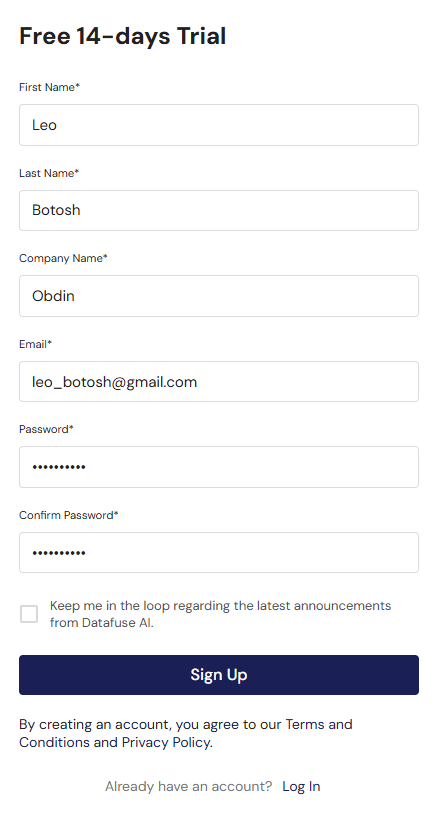
To begin, you need to create your Tenant Account. This account will be associated with your organization’s workspace in DataFuse AI. The user who registers will automatically become the Primary Tenant Owner (SuperAdmin) and will have unrestricted access to all modules.
Registration Form Requirements:
- First Name
- Last Name
- Company Name
- Email Address
- Password
- Confirm Password
For a secure experience, make sure to create a strong password that combines letters, numbers, and symbols.
You can also subscribe to receive blog updates and announcements directly in your inbox.
Once you submit the form, your SuperAdmin account will be created.
1.2 Email Verification (OTP Flow)
After you submit the registration form, DataFuse AI will send an OTP (One-Time Password) to the email address you provided. This step ensures the validity of the email and verifies that you own it.
Steps for Verification:
- Check your inbox for an email containing the OTP.
- Enter the OTP on the verification page to confirm your email address. Click on resend OTP if it expires.
- Once the OTP is verified, your tenant account will be activated.
This step ensures your email address is valid and allows you to proceed with setting up your DataFuse AI tenant.
Now, you can log in to DataFuse AI and start using your tenant to manage your data.
With these simple steps, you'll be ready to start exploring DataFuse AI. From here, you can dive into creating connection profiles, integrating data sources, and much more.
Creating your tenant automatically starts a 14-day free trial (with a small default user limit)—no payment required—so you can explore the full platform immediately. When you need more users, a longer term, or full/production access, open License Management to view your trial status and request a license.
Next Steps:
- Login into System: Login into system and Explore
- Core Modules - Tenant, User & Groups: Learn more about the Tenant and its features.
- Core Modules - License Management: View your trial status and request full access.
- Quick Start Guides: Move forward to explore how to connect your data sources and set up your environment.